
6"Master Your New Action Camera: Essential Setup, Shooting, and Editing Tips"
- bergsi20031989
- Feb 16, 2024
- 10 min read
Updated: Mar 9, 2024
"Action Camera" Master the Essentials - Step by Step Guide
Learning how to "First time Setup and Maintainance your Action Camera"
"Action Camera First Time Setup & Maintainance Guide for Beginners"
Ah, the thrill of unboxing a new gadget! There's something about peeling off that protective film and feeling the fresh tech in your hands that just can't be beaten.
It's time to focus on those crucial first moments with your new gear.
In this blog post, we're not just talking about turning your camera on and hitting record. We're diving deep into the nifty tips and tricks that will transform your first footage from "just okay" to "jaw-dropping."
Because we know how important it is to keep your gear in top-notch condition, we'll also share some advice on maintaining your camera.
Enjoy!
Don't miss out on the latest trends in tech gear, from cutting-edge drones to the best in outdoor equipment and sustainable fashion.
Our newsletter is your gateway to discovering different cool brands, gaining valuable insights, and getting your hands on exciting gear that stands out from the crowd. Whether you're a tech enthusiast, an outdoor adventurer, or a passionist about ethical fashion, we've got something for everyone. We love to discover useful, special and suistainable goods that are bringing value into the life of others. Sign up now to stay informed and inspired by the innovations shaping our world.
First and foremost we will use an easy approach with our language and try to keep it as essential yet detailed to provide you with the best possible effect to catch the information provided.
"Yet, the colorful and brilliant magic lies beyond these words. The images and visuals captured through the lens of your unique worldview are breathtaking and exciting in photography."
Setting Up Your Action Camera: Unpacking and preparing your camera for its first use.
Shooting Your First Video: Essential tips for capturing compelling footage right out of the box.
Maintaining Your Camera: Practical advice to keep your action camera in prime condition.
Setting Up Your Action Camera
To truly unlock your gear's potential and ensure you're ready to capture stunning videos from the get-go, follow these foundational steps
Unboxing and Charging: Start by unboxing your camera and charging it fully. This is a good time to familiarize yourself with the different components, such as the camera, battery, and any mounts or accessories included.
Expert Tip: While the camera charges, download the manufacturer's app on your smartphone. Many action cameras offer enhanced functionality and easier setup through their apps, such as remote control, live previews, and easy sharing options.
Inserting the Memory Card: Most action cameras do not come with built-in storage, so you'll need to insert a compatible memory card. Make sure it's formatted correctly, usually through the camera's settings menu, to avoid any data issues.
Expert Tip: Use a high-speed memory card with at least Class 10 or UHS-I rating to ensure it can handle the high data rates of HD or 4K video recording.
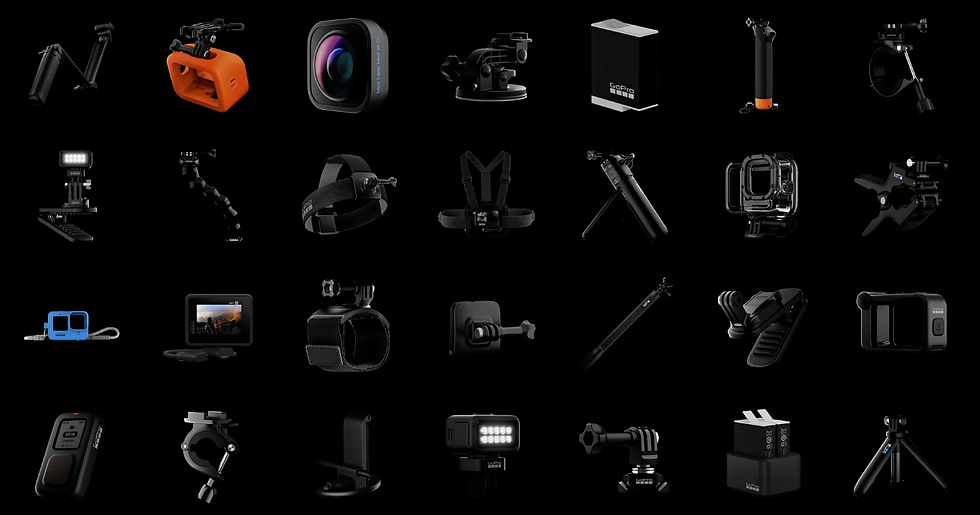
Mounting Your Camera: Depending on your activity, choose the appropriate mount for your camera. Whether it's a helmet mount, chest harness, or a handlebar mount, ensure it's securely attached to avoid losing your camera during action-packed moments.
Expert Tip: When using adhesive mounts, apply them to a clean, flat surface at room temperature, and allow them to set for at least 24 hours before attaching your camera. This ensures a stronger bond and reduces the risk of losing your camera
Adjusting the Settings: Dive into the camera's settings to adjust the resolution, frame rate, and field of view according to your needs. Higher resolutions and frame rates are great for capturing detailed and smooth footage, but they will consume more memory and battery.
Expert Tip: For dynamic and fast-paced activities, consider using a higher frame rate (e.g., 60fps or higher) to capture smooth footage. For cinematic shots, a lower frame rate (24fps or 30fps)
Testing the Camera: Before heading out, test your camera in various conditions and settings. This helps you understand how it performs in different lighting conditions and how long the battery lasts, ensuring you're prepared for your adventure.
Expert Tip: Conduct a 'dry run' of your activity while recording with the camera. This not only tests battery life and storage but also helps you adjust the mounting position and settings for the best possible shot composition and stability.
Familiarizing with Features: Learn about your camera's features, such as image stabilization, slow motion, time-lapse, and waterproof capabilities. Knowing how to use these features can enhance your footage.
Expert Tip: Practice using the camera's quick capture feature if available. This allows you to power on the camera and start recording with a single button press
Updating Firmware: Check if there's a firmware update available for your camera. Manufacturers often release updates to improve performance, add new features, or fix bugs.
Expert Tip: Always back up your settings before updating the firmware. Some updates might reset your camera to default settings,
Packing Extras: For longer trips, consider packing extra batteries, memory cards, and any additional mounts or accessories you might need.
Expert Tip: Organize your extra batteries and memory cards in a waterproof and shockproof case. This not only protects them from the elements but also ensures you can quickly find what you need
Safety First: Always prioritize safety over capturing footage. Ensure your camera and mounts are securely attached and won't interfere with your activity or safety gear.
Expert Tip: If you're engaging in extreme sports or activities in challenging environments, consider using a tether in addition to the mount.
Experiment and Enjoy: Action cameras are all about capturing your adventures from unique perspectives. Don't be afraid to experiment with different angles and settings to find what works best for you.
Expert Tip: Use the editing software recommended by your camera's manufacturer or other popular video editing apps to trim, stitch, and enhance your footage post-adventure.
By following these steps, you'll not only protect your investment but also set yourself up for capturing incredible footage right from the start.

Shooting Your First Video
Now that your action camera is set up and ready to go, it's time to dive into shooting your first video. The goal here is to start exploring the potential of your camera while capturing memorable footage.
Plan Your Shoot: Have a rough idea of what you want to capture. Whether it's a scenic hike, a bike ride, or a day out with friends, planning helps in focusing your efforts.
Expert Tip: Visualize your scenes beforehand and make a shot list. This preparation ensures you capture all desired moments without missing out.
Experiment with Angles: Action cameras are known for their wide-angle shots, but don't shy away from experimenting with different perspectives. Try mounting your camera in various positions to see what looks best.
Expert Tip: Creativity is key; try unconventional mounts like on a helmet side, lower body, or even a drone for unique perspectives.
Steady Does It: While action cameras are built to handle movement, excessively shaky footage can be off-putting. Use mounts or gimbals for stability, especially during high-motion activities.
Expert Tip: Invest in a good quality gimbal or use stabilization features in your camera for smoother footage, crucial for action shots.
Mind the Lighting: Good lighting is key to great video quality. Whenever possible, shoot in natural light and avoid pointing your camera directly at the sun to prevent lens flare.
Expert Tip: Shoot during the "golden hour" for soft, natural lighting. Use reflective surfaces to enhance light in darker settings.
Short Clips are Gold: Instead of recording one long video, shoot shorter clips. This makes it easier to edit your footage later and keeps your content dynamic.
Expert Tip: Short, varied clips not only simplify editing but also keep viewers engaged. Aim for 10-30 second shots for dynamic storytelling.
Explore the Features: Utilize your camera's features such as slow-motion, time-lapse, or burst mode to add variety to your footage.
Expert Tip: Dive into your camera's manual to master its features. Regularly experimenting with modes like HDR or panorama can elevate your content.
Review and Learn: After your shoot, review your footage to understand what worked and what didn't. This will help you improve your skills over time.
Expert Tip: Dive into your camera's manual to master its features. Regularly experimenting with modes like HDR or panorama can elevate your content.
Diving into the world of action cameras is just scratching the surface of what's possible in the vast realms of photography and videography.
The key is to shoot, shoot, and shoot. Consistent practice will gradually transform your skills and your footage into outstanding, captivating footage.

Resources for Mastery
To support you on this path, we want to highlight some resources that offer comprehensive learning opportunities for both beginners and seasoned enthusiasts.
These platforms provide courses, tutorials, and communities that can guide you through everything from the basics to advanced techniques
Online Learning Platforms: Websites like Masterclass, Skillshare, Udemy, and Coursera offer a wide range of courses on photography and videography, including specific classes on action camera usage, video editing, and storytelling.
YouTube Channels: There are countless creators dedicated to teaching the ins and outs of action camera usage, offering free tutorials that cover tips, tricks, and comprehensive guides.
Photography Blogs and Forums: Engage with communities on platforms like Reddit or dedicated photography forums. Here, you can find gear reviews, creative ideas, and troubleshooting help from a global community of enthusiasts.
Workshops and Meetups: Look for local workshops or meetups that focus on action camera photography. These can be great opportunities to learn hands-on and connect with like-minded individuals.
the key to unlocking the full potential of your action camera lies in leveraging these resources, practicing regularly, and being open to experimentation.
The path to mastery is a personal journey, one that evolves with every shot you take.
Editing Software Recommendations
Transforming your raw action camera footage into polished, engaging videos is a crucial step in the content creation process. Whether you're a beginner or have some experience under your belt, there's editing software out there that's just right for your needs.
For Beginners
iMovie (Mac): Perfect for Mac users, iMovie is intuitive and user-friendly, offering drag-and-drop editing, pre-set themes, and simple tools for adding text and transitions.
Shotcut: An open-source, cross-platform editor that's a tad more advanced but remains accessible for beginners. It boasts a wide range of features and format support.
Adobe Premiere Rush: Tailored for social media creators, this simplified version of Premiere Pro provides essential editing tools and straightforward sharing options.
CapCut: A mobile and desktop editing app that's gaining popularity for its ease of use, rich selection of filters and effects, and no-cost access. It's especially favored by content creators looking for quick, impactful edits on the go.
For Intermediate to Advanced Users
Adobe Premiere Pro: A professional-grade editing tool beloved by filmmakers and video editors worldwide, offering a comprehensive set of editing features, effects, and Adobe Creative Cloud integration.
Final Cut Pro X (Mac): A powerhouse for more experienced editors, known for its efficient magnetic timeline, powerful editing capabilities, and optimization for Mac.
DaVinci Resolve: Notable for its professional-grade color correction and audio post-production tools on top of editing capabilities, available in both free and paid versions.
Day-to-Day Tricks for Maintaining and Maximizing Your Action Camera
Wrapping up this comprehensive guide, let’s not overlook the importance of everyday practices that can significantly extend the life of your action camera, enhance its performance, and even contribute to a more sustainable use of technology.
Regular Cleaning and Inspection
Lens Care: Use a soft, microfiber cloth to gently clean the lens. A clean lens means clearer footage.
Check for Damage: Regularly inspect your camera and accessories for any signs of wear or damage, especially after adventurous outings.
Battery Health
Proper Charging: Avoid overcharging the battery; disconnect it once it's fully charged.
Storage: If you're not planning to use your camera for an extended period, store the battery separately in a cool, dry place.
Firmware Updates
Stay Updated: Regularly check for firmware updates. These can improve functionality and fix bugs, ensuring your camera operates smoothly.
Accessory Management
Organize Your Gear: Keep your camera and accessories organized in a protective case. This not only prevents loss and damage but also ensures you’re ready to shoot at a moment’s notice.
Sustainable Practices
Recycling Old Gear: When it’s time to upgrade, consider recycling your old camera and accessories properly. Many manufacturers and retailers offer recycling programs.
Buy Wisely: Invest in high-quality accessories that last longer, reducing the need to replace them frequently.
Learning and Sharing
Community Engagement: Join online forums or local photography groups to share tips, get advice, and stay inspired.
Share Your Knowledge: Help others in your community by sharing your own experiences and insights.

Don't miss out on the latest trends in tech gear, from cutting-edge drones & action cameras to the best in outdoor equipment and sustainable fashion.
Our newsletter is your gateway to discovering different cool brands, gaining valuable insights, and getting your hands on exciting gear that stands out from the crowd. Whether you're a tech enthusiast, an outdoor adventurer, or a passionist about ethical fashion, we've got something for everyone. We love to discover useful, special and suistainable goods that are bringing value into the life of others. Sign up now to stay informed and inspired by the innovations shaping our world.
Are you passionate about or interested in cameras or drones? Check out our Basic Beginner's Guide. We will equip you with the essential knowledge needed to find your perfect choice.
Explore Our Camera Basics Guide Don't miss our detailed blog post series on camera basics. Designed for everyone at every level, this step-by-step guide is your roadmap to safe and relaxed flying.
Explore Our Suistainable Fashion Guide Don't miss our detailed blog post series on sustainability in fashion and their leading brands. Designed for everyone who loves cool & innovative fashion plus is looking for that little extra to support, this step-by-step guide is your roadmap to new different and exciting clothes.
FAQs About Getting Started with Your New Action Camera
Unboxing Your New Action Camera: What Are the First Steps? Begin by carefully unboxing and organizing all components. Fully charge the battery, insert a high-quality memory card, get acquainted with the camera settings, update the firmware if needed, and experiment with different mounts to secure your camera effectively.
Tips for a Successful First Video Shoot with Your Action Camera Evaluate your surroundings, particularly the lighting conditions. Apply the rule of thirds for better composition, explore various perspectives, tweak camera settings like resolution and frame rate, and aim for short clips to simplify editing. Above all, practice and experimentation are crucial.
Beginner-Friendly Editing Software for Action Camera Footage For novices, iMovie (for Mac users), Shotcut, Adobe Premiere Rush, and CapCut are superb choices. These platforms provide user-friendly interfaces and the basic editing tools needed to start refining your action camera videos.
Daily Maintenance Tips for Your Action Camera Maintain your camera and lens with a soft cloth, store batteries correctly, regularly update your camera's firmware, check and care for your accessories, and adhere to proper recycling protocols for outdated equipment.
Learning Resources for Action Camera Videography and Editing Delve into online learning platforms like Udemy, Coursera, and Skillshare for detailed courses. YouTube is an excellent free resource for tutorials, tips, and product reviews. For more hands-on learning, consider joining workshops and seminars.


Comments